You know that feeling at the end of a long, busy day when you can’t name a single meaningful thing you actually accomplished? You were busy the whole time. But nothing moved. This article is about fixing that — permanently.
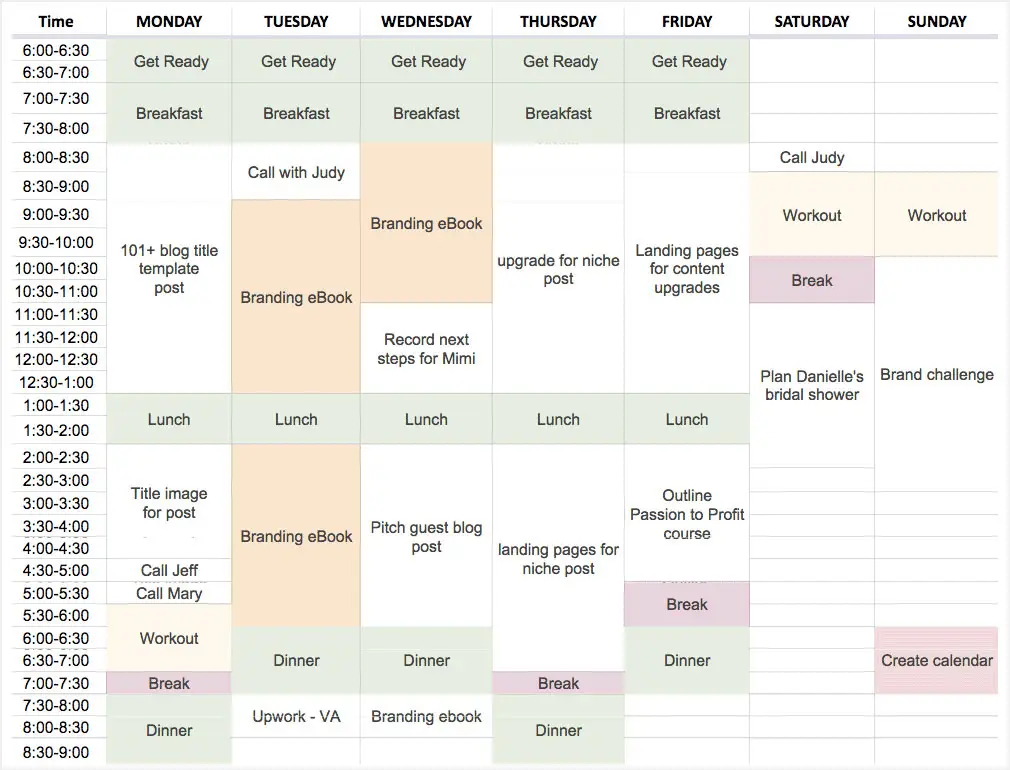
A time-blocked daily schedule — turning a to-do list into a real plan with dedicated time slots
⚠️ Quick Note Before You Start Time blocking is a productivity method — not a one-size-fits-all solution. It works exceptionally well for knowledge workers, students, freelancers, and remote workers. If you work in a highly reactive role (emergency services, frontline customer service), the rigid-schedule elements may need adapting. Start with the parts that fit your situation and build from there. |
📋 What’s in this article 1. What is time blocking? (The simple version) 2. Why your brain loves it — the science explained 3. How the world’s most productive people use it 4. The four types of time blocks you need 5. The full beginner’s sample schedule 6. Step-by-step: How to set up your first time-blocked week 7. Tools to use (free and paid) 8. Time blocking vs. to-do lists — why lists alone fail 9. Common mistakes and how to fix them 10. Conclusion 11. FAQs |
1. What Is Time Blocking? (The Simple Version)
Time blocking is a time management method where you divide your day into dedicated chunks of time — called ‘blocks’ — and assign each block to a specific task or category of work. Instead of starting your day with a vague to-do list and hoping you get through it, you decide in advance exactly what you will work on and when.
That’s it. No complicated system. No special app required. A calendar, a task list, and the decision to plan ahead.
Cal Newport, the Georgetown University professor who wrote Deep Work — one of the most influential productivity books of the last decade — calls it “the most effective productivity habit I have ever adopted.” He blocks every single minute of his workday, including time for email, breaks, and shallow administrative tasks.
💡 In one sentence Time blocking turns your to-do list into an actual schedule — so instead of a list of things you hope to do, you have a concrete plan for when exactly each thing will happen. |
2. Why Your Brain Loves It — The Science Explained
Time blocking isn’t just a popular trend. There are several well-researched psychological and neurological reasons why it works better than most other productivity approaches.
The 23-Minute Switching Tax
Research by Gloria Mark at the University of California found that when you’re interrupted from a task — or switch to another task voluntarily — it takes an average of 23 minutes to fully return to the same level of deep focus. In a typical reactive workday, this happens many times per hour. Time blocking eliminates most of these interruptions by protecting extended blocks where you do not switch tasks.
Attention Residue
Cognitive scientist Sophie Leroy coined the term attention residue to describe what happens when you switch from one task to another before fully completing the first. Part of your brain stays on the previous task — quietly in the background — reducing your cognitive capacity for the new one. Time blocking fixes this by creating clear, defined endpoints for each task, giving your brain permission to release it before moving on.
Implementation Intentions
Psychologist Peter Gollwitzer’s research on ‘implementation intentions’ found that deciding in advance not just what you’ll do, but specifically when and where, dramatically increases follow-through — by as much as 2 to 3 times compared to just having a goal. A to-do list says ‘write the report.’ A time block says ‘write the report from 9 to 11am on Tuesday.’ The second version activates a different, far more reliable psychological mechanism.
Decision Fatigue and the Open Loop Problem
Every unscheduled task creates what psychologists call an ‘open loop’ — a mental thread your brain keeps alive in the background because the task has no assigned time. These open loops accumulate throughout the day, consuming mental energy and creating background anxiety. Time blocking closes these loops in advance. When you assign every task a specific block, your brain can stop monitoring them — reducing cognitive load and mental fatigue significantly.
📊 What the research says Productivity increases up to 40% when tasks are completed in dedicated focused blocks vs. reactive multitasking (Bitrix24 / University research, 2025) The average knowledge worker spends just 2 hours 48 minutes per day on genuinely focused, productive work — out of an 8.8-hour workday (RescueTime, 50,000 workers) A 40-hour week of properly blocked time produces the same output as a 60+ hour reactive week (Cal Newport, Georgetown) Cognitive performance varies by 15–30% depending on when during the day you do cognitively demanding work — timing your blocks matters |
3. How the World’s Most Productive People Use It
Time blocking is not a new idea — some of history’s most prolific achievers structured their days this way long before the term existed.
- Elon Musk uses a 5-minute block system for his entire day, scheduling everything — including meals — in precise increments. Every minute is accounted for.
- Bill Gates is famous for ‘Think Weeks’ — extended periods of total isolation for deep, uninterrupted thinking. This is time blocking at its most extreme: blocking an entire week for a single type of work.
- Cal Newport blocks every minute of his workday on paper, including buffer time and unexpected tasks. He also practices ‘shutdown rituals’ — a formal end-of-day process to close all open loops before leaving work.
- Benjamin Franklin famously structured his entire day in 2-hour blocks from 5am, including dedicated time for ‘powerful goodness’ (his term for learning and improvement) each morning.
What these people have in common is not superhuman discipline. It’s a structural decision made once — to plan the day in advance — that removes the need for discipline moment-to-moment. The plan does the thinking; you just follow it.
4. The Four Types of Time Blocks You Need
Not all blocks are the same. A well-designed time-blocked day uses four distinct types of blocks, each serving a different purpose. Understanding these types is what separates people who use time blocking effectively from those who try it once and abandon it.
Block Type | What goes here | Best time of day |
Deep Work | Writing, coding, design, strategy, complex problem-solving | 2–4 hours of peak energy time; mornings for most |
Shallow Work | Email, Slack, scheduling, admin, data entry, routine updates | Lower-energy periods; afternoons work well |
Creative | Brainstorming, ideation, content planning, reading | Mid-morning or post-lunch for many people |
Recovery | Breaks, walking, lunch, short meditation | Between deep work blocks; non-negotiable |
🔑 The most important insight Most people schedule their most cognitively demanding work for low-energy periods (like after a heavy lunch or late afternoon), and let shallow reactive tasks (email, Slack) eat their peak morning hours. Time blocking forces you to consciously reverse this. Protect your peak hours for deep work. Let shallow work happen in the margins. |
5. The Full Beginner’s Sample Schedule
Here is a complete time-blocked day built on the principles above. This is a starting template — adapt it to your own chronotype, role, and commitments. The times are illustrative; what matters is the structure and the order.
Time | Block | Type | Notes |
6:00–7:00 AM | Morning Routine | Personal | Non-negotiable — protect this |
7:00–9:00 AM | Deep Work Block 1 | High Focus | Hardest task of the day |
9:00–9:15 AM | Break | Rest | Walk, stretch, water |
9:15–11:00 AM | Deep Work Block 2 | High Focus | Creative / strategic thinking |
11:00–11:30 AM | Email & Messages | Shallow | Batch all comms here |
11:30 AM–1 PM | Meetings / Calls | Collaborative | Batch scheduled calls |
1:00–2:00 PM | Lunch Break | Rest | Step away fully |
2:00–3:30 PM | Deep Work Block 3 | Medium Focus | Admin, analysis, learning |
3:30–4:00 PM | Email & Review | Shallow | Second comms check |
4:00–5:00 PM | Planning / Wrap-Up | Admin | Plan tomorrow’s blocks |
📌 Important notes on this schedule Deep Work blocks are protected. No meetings, no email checks, no Slack during these times. Treat them like surgical appointments. Two email/comms checks per day is standard for most roles. Research consistently shows that checking email in batches (rather than continuously) reduces total time spent on email by 30–40% while reducing stress. The 4–5pm ‘Planning and Wrap-Up’ block is the most underused yet highest-value block in the day. Planning tomorrow’s schedule today means you start tomorrow already knowing exactly what to do — no decision fatigue. |
🔗 Related reading on this site If you work for yourself or from home, time blocking is even more important — because no one is creating structure for you. Read our companion guide: 10 Ways to Make Money From Home in 2026 — each method in that article becomes significantly more profitable when you apply a disciplined time blocking system to your working day. |
6. Step-by-Step: How to Set Up Your First Time-Blocked Week
Follow these steps in order. Each builds on the last. The whole setup takes about 45 minutes the first time; after that, your weekly planning session should take 20–30 minutes.
1 | Do a full task and commitment audit (30 mins) Before you can block time, you need to know everything that needs your time. Write down every recurring commitment (meetings, calls, school runs), every active project, every ongoing responsibility, and every personal priority. Don’t organise — just capture everything. Use paper, a notes app, or a spreadsheet. This is your complete inventory of everything competing for your time. |
2 | Categorize each task: Deep, Shallow, Creative, or Recovery Go through your list and label each item with one of the four block types from Section 4. Deep work requires sustained focus and no interruptions. Shallow work is routine and low-concentration. Creative is generative thinking. Recovery is rest and breaks. This categorization determines where in your day each task should go. |
3 | Identify your peak energy hours This is personal. Most people have their highest cognitive energy in the morning, between roughly 8am and 12pm. Others peak in the late morning or early evening. Think about when you naturally feel most alert, focused, and capable. If you’re not sure, track your energy levels for 3 days — rate your focus on a scale of 1 to 10 every hour. Your peak hours are where your deep work blocks go. |
4 | Block your non-negotiables first Open your calendar and lock in everything you cannot move: existing meetings, school pick-up, gym sessions, standing calls. These are fixed anchors. Now you can see the actual open time available for your own work — which is often less than people assume. This is clarifying, not discouraging. |
5 | Assign deep work blocks to your peak hours In your peak energy windows, schedule your most important deep work blocks. Aim for 90–120 minute blocks — research shows this aligns with the brain’s natural ‘ultradian rhythm’ of sustained focus. Do not schedule more than 3 to 4 hours of genuine deep work per day. This sounds limiting, but it is realistic: most people cannot sustain deep focus beyond this regardless of effort. |
6 | Batch your shallow work and communications Assign two fixed communication windows per day — one mid-morning (around 11am) and one mid-afternoon (around 3:30pm). All email, Slack, and messages are handled only in these windows. Outside these windows, notifications are off. This is the single change that most dramatically reduces the fragmentation of a typical workday. |
7 | Add buffer blocks and a daily planning block Schedule one 30-minute ‘buffer’ block each day for unexpected tasks, overruns, and things that take longer than planned. Things always take longer than planned. Without a buffer, the first overrun cascades and destroys the rest of the day. Also add a 30–60 minute planning block at the end of each day to review what happened, capture new tasks, and block tomorrow. This end-of-day ritual is what makes the system self-sustaining. |
8 | Run the plan and review at the end of the week Your first week will not go perfectly. That is fine and expected. At the end of the week, spend 20 minutes reviewing: Which blocks did you keep? Which got disrupted and why? What needs adjusting? The system improves each week through iteration. Most people feel a meaningful difference within 2 weeks and consider it irreversible after 4 weeks. |
7. Tools to Use (Free and Paid)
You do not need any special tool to start time blocking. A paper planner works perfectly and is often the best starting point because it has zero friction and no distracting notifications. Once you have the habit established, digital tools add power.
Tool | Cost | Rating | Platform | Best for |
Google Calendar | Free | ⭐⭐⭐⭐ | Any device | Best free starting point |
Reclaim.ai | Free/Paid | ⭐⭐⭐⭐⭐ | Web + Mobile | AI auto-scheduling |
Motion | Paid (~$19/mo) | ⭐⭐⭐⭐⭐ | Web + Mobile | Full AI time blocking |
Notion Calendar | Free | ⭐⭐⭐⭐ | Web + Mobile | Works inside Notion |
Paper/Planner | Free | ⭐⭐⭐⭐ | Physical | Best for beginners |
🔍 What to search to find these tools For apps: “Reclaim.ai time blocking review 2026” · “Motion app review productivity” · “Google Calendar time blocking setup” For templates: “time blocking template free download” · “Notion time blocking template” · “printable time blocking planner” For deeper learning: “Cal Newport Deep Work summary” · “time blocking science research” · “attention residue study Leroy” |
8. Time Blocking vs. To-Do Lists — Why Lists Alone Fail
To-do lists are not useless — they are excellent for capturing tasks. The problem is using a list as your only productivity system, without ever scheduling when each task will happen.
The core problem with lists: A to-do list has no relationship with time. It doesn’t know that you have four hours of meetings on Tuesday, or that your best thinking happens before 10am, or that ‘write the presentation’ actually takes three hours, not the 30 minutes you’ve been kidding yourself about. A list can grow infinitely. Your time cannot.
What time blocking adds: Time blocking takes the task list and asks the most important question productivity advice usually skips: when, exactly, is this going to happen? Forcing each task onto a real calendar slot reveals whether your task list is actually realistic — and almost always shows that you have been planning to do two or three times more than the available time allows.
The combination that works: Use a task list to capture everything. Use time blocking to decide when each captured task happens. The list is the inventory. The calendar is the execution system. Neither alone is sufficient.
9. Common Mistakes and How to Fix Them
- Over-blocking the day. The most common mistake. People look at 8 hours and schedule 8 hours of work blocks. Then one thing runs long and everything cascades. Fix: plan to use only 60–70% of your available time. Buffer blocks absorb reality.
- Treating all tasks as ‘deep work.’ Not everything deserves a focused block. Booking a flight, responding to routine email, filling in a form — these are shallow tasks. Scheduling them as deep work blocks wastes your peak energy hours. Categorise honestly.
- Not defending the blocks. A time block on your calendar means nothing if you agree to meetings over it or check Slack every 10 minutes during it. The block only works if you treat it as a real commitment. Turn off notifications. Set your status to ‘do not disturb.’ Tell colleagues you’re unavailable.
- Abandoning it after one bad day. A disrupted day doesn’t mean time blocking doesn’t work. It means something happened. Reschedule what you missed, adjust tomorrow’s blocks, and continue. The system is designed to be rebuilt each day — not to be perfect.
- Blocking without knowing your chronotype. Scheduling deep work at 9pm if you’re a morning person — or at 7am if you’re a night owl — wastes the method entirely. Your energy determines your schedule, not the other way around.
- Ignoring personal time. Time blocking is for your whole day, not just work. Block exercise, meals, family time, and recovery. People who only block work hours often find work expanding to fill all unblocked time — the opposite of the goal.
10. Conclusion
Time blocking is, at its core, a very simple idea: decide in advance what you will do and when, rather than leaving it to chance and reactive impulse. The reason it works so reliably — and the reason people call it life-changing — is that it solves every major problem with how most people plan their days simultaneously: the context switching, the open loops, the email-first mornings, the perpetual busyness with no progress.
It is not a rigid, stressful system. Done properly, time blocking actually reduces daily stress — because you start each day already knowing what’s happening, rather than improvising hour by hour and hoping you’ll somehow find time for the things that matter.
Start with just three changes this week: (1) Block your top two hours of the morning for your most important task. (2) Check email only twice a day. (3) Spend 10 minutes at the end of today planning tomorrow. That’s the minimum viable version of time blocking. Do those three things consistently for two weeks and you will not go back to an unstructured to-do list.
11. Frequently Asked Questions (FAQs)
Q: How long should each time block be? |
A: The research-backed sweet spot for deep work is 90–120 minutes, aligned with the brain’s natural ultradian focus cycle. For shallow tasks, 30–45 minute blocks are usually sufficient. Avoid blocks shorter than 25 minutes for anything requiring real focus — it takes approximately 15–20 minutes to reach full concentration, so very short blocks produce little deep work. Do not schedule more than 4 hours of genuine deep work per day. |
Q: What if my job is full of unexpected interruptions and I can’t control my schedule? |
A: Time blocking still helps — but you adapt it. Schedule your most important task first thing in the morning, before interruptions arrive. Use ‘reactive blocks’ — dedicated periods where you’re available for interruptions and ad-hoc requests — so that when interruptions happen, they happen in a contained window rather than throughout the day. Even partial time blocking is dramatically better than no structure at all. |
Q: Does time blocking work for students? |
A: Extremely well. Students often have the most flexible schedules and therefore the most to gain from adding structure. Time block study sessions by subject, not by vague ‘study time.’ ‘Study from 6–9pm’ is ineffective. ‘Read Chapter 4 (6–7pm), practice problems (7–8pm), review notes (8–8:30pm)’ is effective. Specificity is what makes blocks work. |
Q: I tried time blocking before and it fell apart by day two. What went wrong? |
A: Almost certainly one of three things: (1) You over-scheduled — planned more than was realistically possible. (2) You didn’t add buffer blocks, so the first delay cascaded into everything else. (3) You didn’t defend the blocks — notifications stayed on, meetings were allowed over them. The system requires protection to function. Start simpler than you think necessary and build gradually. |
Q: Can I time block on paper instead of a digital calendar? |
A: Not only can you — for many people, paper is better for starting out. A paper planner has no notifications, no apps to configure, no technical friction. Draw a simple vertical timeline of your day, divide it into columns for each day of the week, and fill in your blocks with a pen. The physical act of writing reinforces commitment. Many serious practitioners combine paper planning for daily scheduling with a digital calendar for meetings and appointments. |
Q: What is the difference between time blocking and the Pomodoro technique? |
A: Pomodoro uses fixed 25-minute work intervals followed by 5-minute breaks, regardless of task type. Time blocking assigns specific tasks to specific calendar slots of variable length, chosen based on the task. They’re not mutually exclusive — some people use Pomodoro intervals within a time block. But time blocking addresses the higher-level question of what gets your time and when, while Pomodoro addresses how you sustain focus within a single working session. |
This article contains no paid placements. Tool recommendations are based on independent review.